Now in early access for chiropractic practices. Request a demo

LUCidOne Request a demo

The whole practice, in one clear system.

Charting, scheduling, patient texts, care plans, billing and referrals in one place, built by a chiropractor who runs his own office on it every day.

LUCid One patient flow screen: today's appointments, patients checked in with Ready for doctor buttons, and the day's counts, with sample patients

Today

12 of 18 seen

Dr. Jonathan Lazar, D.C., who built LUCid One

Care plan · Jordan Testerson

Corrective plan8 of 24 visits

Active

Missed call · 12:41 PM

Sorry we missed your call. Reply here and we will help.

Can I come in Thursday?

Ready for doctor

Avery SampleRoom 2 · waited 6 min

Open

New provider referral

Taylor Sampletonfrom Dr. Dana Example, MD

Call to schedule
DD

Dr. Demo Room 2 is ready for the next patient, please send them back.

Built for upper cervical, cash and care-plan practices

  • Charting
  • Scheduling
  • Patient texts
  • Care plans
  • Billing
  • Patient referrals
  • Provider referrals
  • Forms
  • Office TV screens

The problem

Five tools, one front desk, and patients in the gaps.

Most offices run on a charting program, a marketing CRM, a texting app on someone's phone, a form builder and a group chat. None of them talk to each other, so your team types the same patient into three places and hopes nothing slips.

  • Double entry. The same name, phone and visit typed into one system, then another.
  • Leaks. A missed call nobody returns. A next visit nobody booked. A care plan that never started.
  • Notes after hours. Charting that waits until the last patient leaves.
Charting software, a marketing CRM, a texting app, a form builder and team chat, replaced by one system: LUCid One.

What it does

One system for the whole day.

The EHR

An EHR built around how a chiropractic day really runs.

From the schedule to the signed note, every screen is made for a busy floor: fast notes, clear signals, and nothing your team has to type twice.

  • Smart charting. Shorthand that opens to the full description, and a Scribe that drafts from the consultation. Nothing is added until you select it.
  • Ready for doctor and Patient waiting. The doctor sees who is ready, and who is still waiting to be measured, without asking.
  • Privacy mode. On a computer patients can see, pop-ups show no names until clicked.
  • Care plans on the chart. Visits used, status and dates on every plan, and visit rows colored by type.
Learn more on a demo
Week schedule with color bands for new patient exams and lunch, and sample appointments
Color bands on the schedule. New patient exams, re-exams and lunch are marked right on the calendar, so each visit lands in the right slot.
Patient flow: arrived, checked in, room, wait time and Ready for doctor for each sample patient
The whole floor on one screen. Arrived, checked in, which room, how long they have waited, and one tap for Ready for doctor.
Doctor's screen with pop-ups: Casey is waiting, not yet measured; Avery is ready. A Ready for doctor list sits in the corner
Ready for doctor, and Patient waiting. Alerts follow the doctor anywhere in the system, with a running list of who is next.
Complaints card: each complaint shows the patient's own words, with Better, Worse and Same buttons Scribe review: a problem drafted from the consultation transcript, with the patient's words beside it and an Add selected button
Shorthand and Scribe. Each complaint keeps the patient's own words; mark it better, worse or same in one tap. The Scribe drafts from the consultation, and you choose what goes in.
Clinical tab for a sample patient: diagnoses, traumas, surgeries and medications in cards Visit history with rows colored for new injury, re-exam and X-ray, and filter chips above
The clinical picture, at a glance. History, medications, imaging and labs in cards you can fold away, and visit rows colored for re-exams, X-rays and new injuries.
Care plans tab: a sample plan with visits used, active status and start date, and a button to start a plan
Care plan status on the chart. Visits used, status, start and end on every plan, and starting a plan creates its charge.
Patient-facing computer: a Private message pop-up that says Click to view, and a Patient-facing chip in the top bar
Patient-facing privacy mode. On a computer patients can see, pop-ups say Private message until clicked, call pop-ups stay off and alert sounds go quiet.

Patient-to-patient referrals

Make it easy for patients to introduce a friend.

Every patient in active care gets a personal link. An introduction takes about a minute, and your team takes it from there.

  • A personal link in the patient portal. Copy it or share it from the phone. The page greets the patient by name.
  • One short form. The friend's first name and mobile number, and an optional note for the front desk. No app, no account.
  • Your team follows up. The front desk gets a call task, and the doctor gets a reminder to write a thank-you by hand. The form itself texts no one.
  • Links you can see working. Make, text and copy a patient's link, and see texts sent and clicks for each one. Spam checks, rate limits and a daily cap guard the form.
Learn more on a demo
Two phone screens: the patient portal card Share with a friend or family member with Copy link and Share, and the referral page greeting Avery by name
The patient shares their link. It lives in the patient portal with Copy and Share buttons, and the referral page greets them by name.
Two phone screens: the friend's first name, last name and mobile number filled in, and the thank-you screen saying the front desk will call Jamie
The introduction takes a minute. One or more friends, an optional note for the front desk, and a clear thank-you that says what happens next.

What your team gets

  • Patient referral: call to introduce and scheduleFront desk · the friend's details and the patient's note
  • Handwritten thank-you note (within 48 hours)Doctor · for the patient who made the introduction

A new friend is added to your CRM with who introduced them, and the referring patient's count goes up. A friend who is already a patient is skipped quietly, and the same friend is not counted twice within 90 days.

A person follows up, not a bot. The front desk calls to introduce and schedule, and the doctor thanks the patient by hand. Task titles shown are the ones the system creates.
Patient links screen: generate a link for a sample patient, text it or copy it, and a table of links with texts sent and clicks
See which links get used. Make a patient's link, text it from an approved message within texting hours, and see texts sent and clicks for every link.

Provider referral relationships

Give every referring provider their own front door.

Family doctors, dentists, neurologists and other providers get a personal referral page and guide. Their referrals land in your EHR with the provider attached, so you always know who sends whom.

  • A guide for each partner. Prepared for that provider by name, with their own referral link and QR code.
  • Referring takes about a minute. The patient, the reason, and the kind of visit the provider wants: consultation, evaluation, or the full pathway.
  • Both sides hear back. The patient gets a welcome text, the referring office gets a confirmation text, and the provider can ask for updates after the evaluation.
  • A provider directory in the EHR. Every outside provider, how many patients each has and in what role, with lookups from the NPI Registry.
Learn more on a demo
Referral guide prepared for a sample family doctor, and the practice's own referral page address with a QR code
A referral guide for each partner. Prepared for that provider by name, with who you see, how the visit runs, and their own link and QR code.
Provider referral form: Referring as a sample family doctor, with the patient's name, mobile, email, date of birth and reason filled in
Referring takes about a minute. The provider's link fills in who is referring. They add the patient, the reason, the kind of visit, and whether they want updates.
Referral sent: a ready-to-copy message for the patient, and a note that the patient receives a welcome text and the office a confirmation text
Both sides hear back right away. A message the provider can paste into their own portal, a welcome text to the patient, a confirmation text to the office, and a call task for your front desk.
Outside providers screen: sample providers with specialty, city, phone, number of patients and how many each referred
Every outside provider in one directory. Sort by patients to see which relationships matter most, broken out by role: primary care, dental, PT, neurology and referred.
One sample provider's page: contact details and the list of sample patients linked to them, as referring provider or primary care
Each relationship, patient by patient. A provider's page lists every patient linked to them, and whether they referred the patient or provide their primary care.

Billing and care plans

Care plans that sell and collect themselves.

Price a plan in the calculator, share it with the patient, and let billing follow every visit.
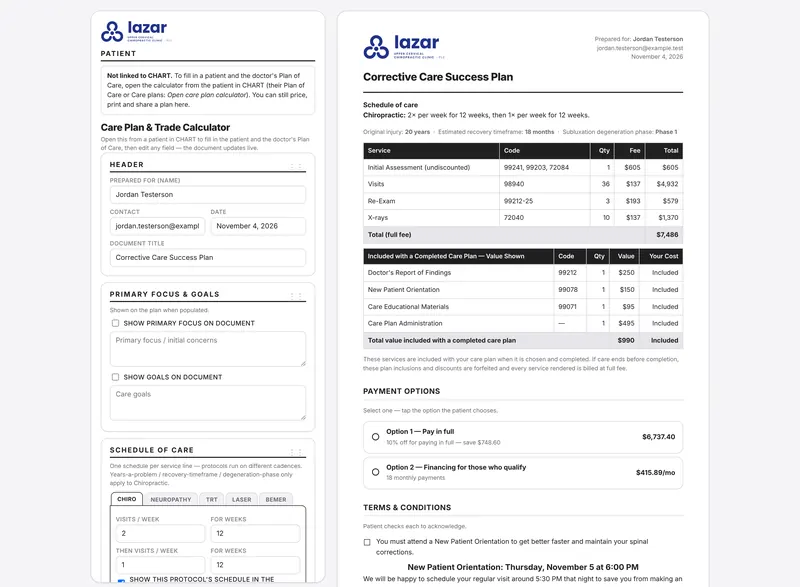
  • The calculator builds the plan the patient sees, with payment options and terms to check.
  • The signed plan flows into billing, and every visit counts against it.
  • Rules for a $0 Day 1 and promotions are built in.
  • Care plan status, visits used and dates on every chart.
Learn more on a demo
Care plan calculator beside the care plan it builds, with services, payment options and terms for a sample patient

Care plan · Jordan Testerson

Corrective plan8 of 24 visits

Active

Texts and reminders

Patients hear back, even when you miss the call.

Texts, email and reminders come from the same system that holds the schedule and the chart.
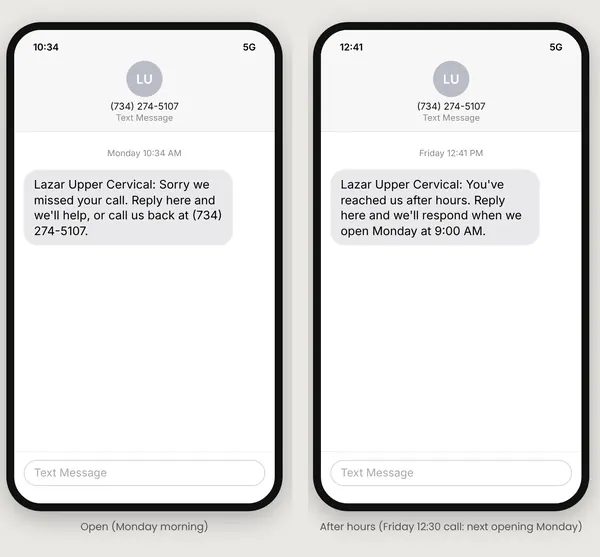
  • Missed-call text-back that follows your office hours.
  • Reminders by visit type, sent by text or email.
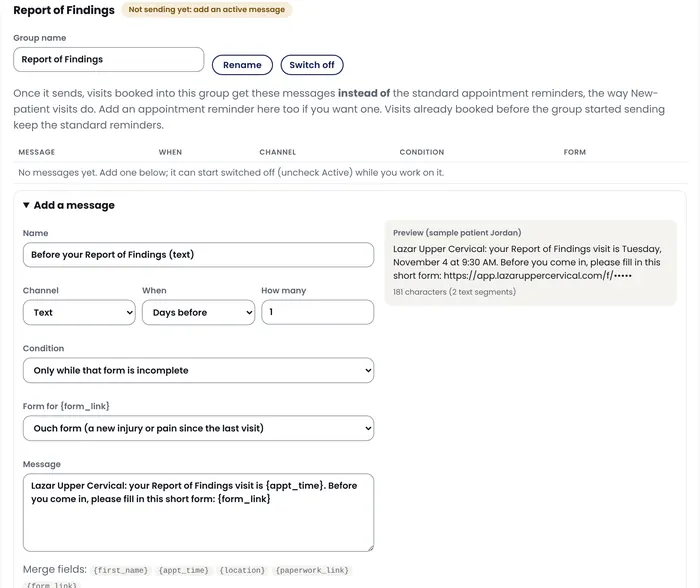
  • Reminders can carry a form link, and stop once the form is done.
  • Team messages pop up where people are already working.
Learn more on a demo
Two phones showing missed-call texts: one during office hours, one after hours with the next opening
DD

Dr. Demo Room 2 is ready for the next patient, please send them back.

Scheduling

A schedule your front desk can read at a glance.

The calendar, the patient flow and the doctor stay in step all day.
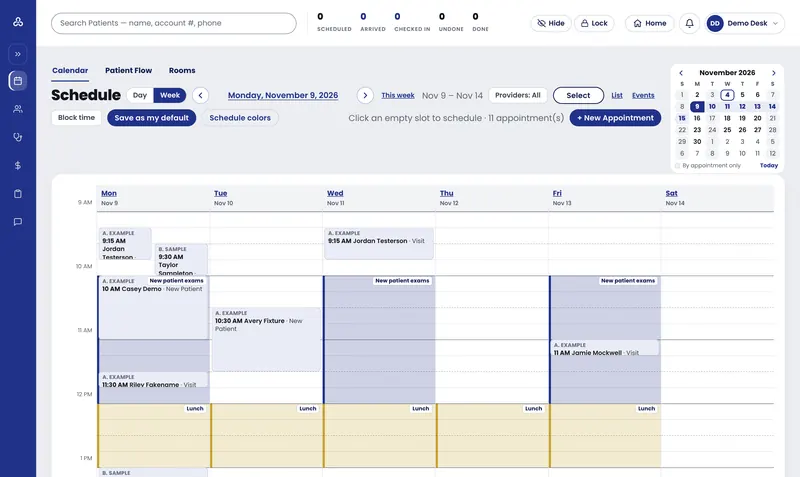
  • Color bands for new patient exams, re-exams and lunch.
  • Patient flow: arrived, checked in, which room and how long they have waited.
  • Ready for doctor in one tap, with an alert that reaches the doctor.
  • Several providers side by side on the same day.
Learn more on a demo
Week schedule with color bands for new patient exams and lunch, and sample appointments
Ready for doctor

Avery SampleRoom 2 · waited 6 min

Open

Everything else

And the rest of the office, in the same system.

Visit message settings: a text the day before a visit with a form link, sent only while the form is incomplete

Forms and intake

Reminders by visit type can carry a form link, and stop once the form is done.

Learn more
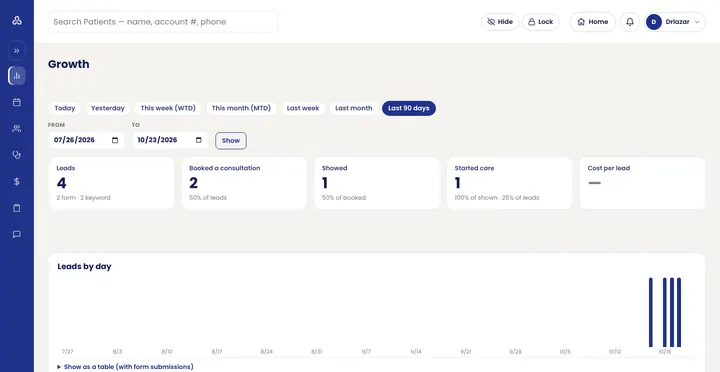
Practice numbers: leads, consultations booked, shows and starts, with a chart of leads by day, in sample data

Practice numbers

Leads, consultations booked, shows and starts, by day, week or any range you pick.

Learn more

Office TV screen with a designed slide and the practice's contact line

Office TV screens

Lobby screens with your own slides, upcoming events, the weather and a news ticker.

Learn more
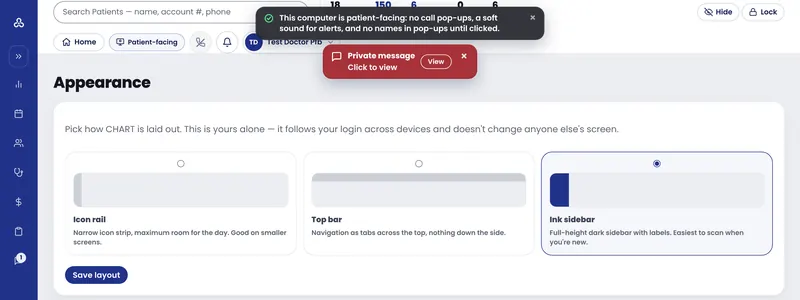
Patient-facing computer: a Private message pop-up that says Click to view

Patient-facing privacy mode

On a computer patients can see, pop-ups show no names until clicked.

Learn more
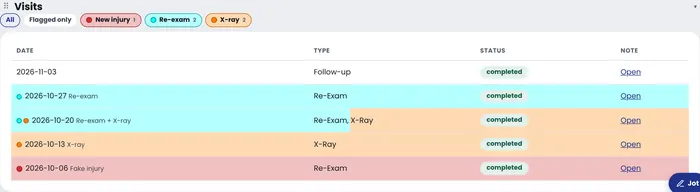
Visit history with rows colored for new injury, re-exam and X-ray

Visit history at a glance

Visit rows colored for re-exams, X-rays and new injuries, with filters on top.

Learn more
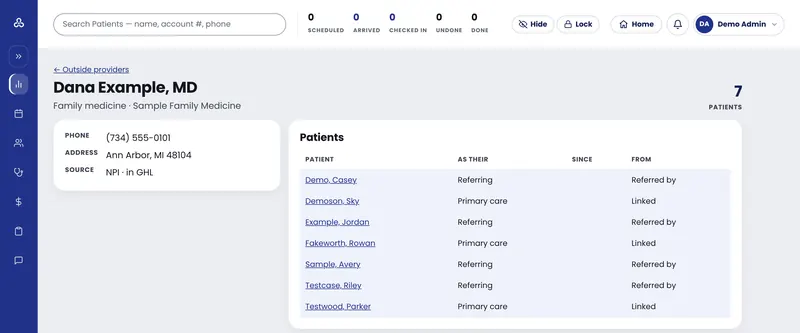
One sample provider's page with the patients linked to them

Every provider relationship

Each outside provider with the patients they referred or care for.

Learn more

Built in a real practice

Made by a chiropractor, used every day.

LUCid One started inside the Ann Arbor, Michigan office of Dr. Jonathan Lazar, D.C., where his team runs the practice on it every day. Every screen on this page comes from that work, shown with sample patients. The idea behind it: clarity before change.

Who it's for

Built first for upper cervical, cash and care-plan practices.

  • Upper cervical offices that measure, re-examine and track progress over a plan of care.
  • Cash and care-plan practices that want plans priced, signed and billed in one flow.
  • Offices that rely on referrals, from patients and from other providers.
  • Teams tired of running the day across five tools.
Early access

A small group of practices first.

We are bringing LUCid One to a small number of practices first, so each one gets setup help from the team that built it.

Request a demo

Questions

What practices ask first.

Anything else, ask us on the demo.

We use ChiroTouch or Jane today. Can we switch?

That is the switch LUCid One was built for. On the demo we look at what you use now, what your team relies on every day, and what a move would involve for your office.

What happens to our existing patient data?

We plan the move with you before anything changes: what your current system can export, what should come across, and when to switch. We will be specific about your system on the demo.

How much does it cost?

Pricing is shared on the demo, once we know your practice size and what you need.

Does it handle insurance billing?

LUCid One was built for cash and care-plan practices first. If your office bills insurance heavily, ask us on the demo where insurance billing stands today, and we will tell you plainly whether it fits your office yet.

Is it only for upper cervical practices?

No. It was built in an upper cervical practice and fits cash and care-plan offices first, but any chiropractic office is welcome to ask for a demo.

What does the demo look like?

A live walk-through of the screens on this page with a sample practice and sample patients, then a conversation about your office. No pressure and no obligation.

Are the screens on this page real?

Yes. They are taken from the working system with sample patients and sample data. No real patient appears on this page.

See LUCid One with your own office in mind.

A live walk-through with a sample practice, then a conversation about yours.

Request a demo

Request a demo

Tell us about your practice.

Dr. Lazar's team will reach out to find a time.

Dr. Jonathan Lazar, D.C.
Dr. Jonathan Lazar, D.C.Lazar Upper Cervical, Ann Arbor, Michigan
Ready for doctor

Avery SampleRoom 2 · waited 6 min

Open

New provider referral

Taylor Sampletonfrom Dr. Dana Example, MD

Call to schedule

We use these details only to set up your demo. Please do not include patient information.